Mastering RBAC in K8s: Control Who Can Do What 🛡️☸️
Part-7
So far, we’ve explored many Kubernetes concepts — how to build applications, run them, manage downtime, handle traffic, and expose services. But there’s one critical piece that truly holds everything together: security 🔐.
What happens if a development team gets unrestricted access to all pods?
What if the testing team can modify every deployment in the cluster?
That wouldn’t be safe — and definitely not ideal. In real-world environments, access must always have limits. Not everyone should be able to do everything.
This is where RBAC (Role-Based Access Control) comes into play. RBAC helps us define who can access what and to what extent inside a Kubernetes cluster. It ensures that every user, team, or application only has the permissions they truly need — nothing more, nothing less.
With RBAC, we bring structure, control, and security to our Kubernetes environment. 🚀
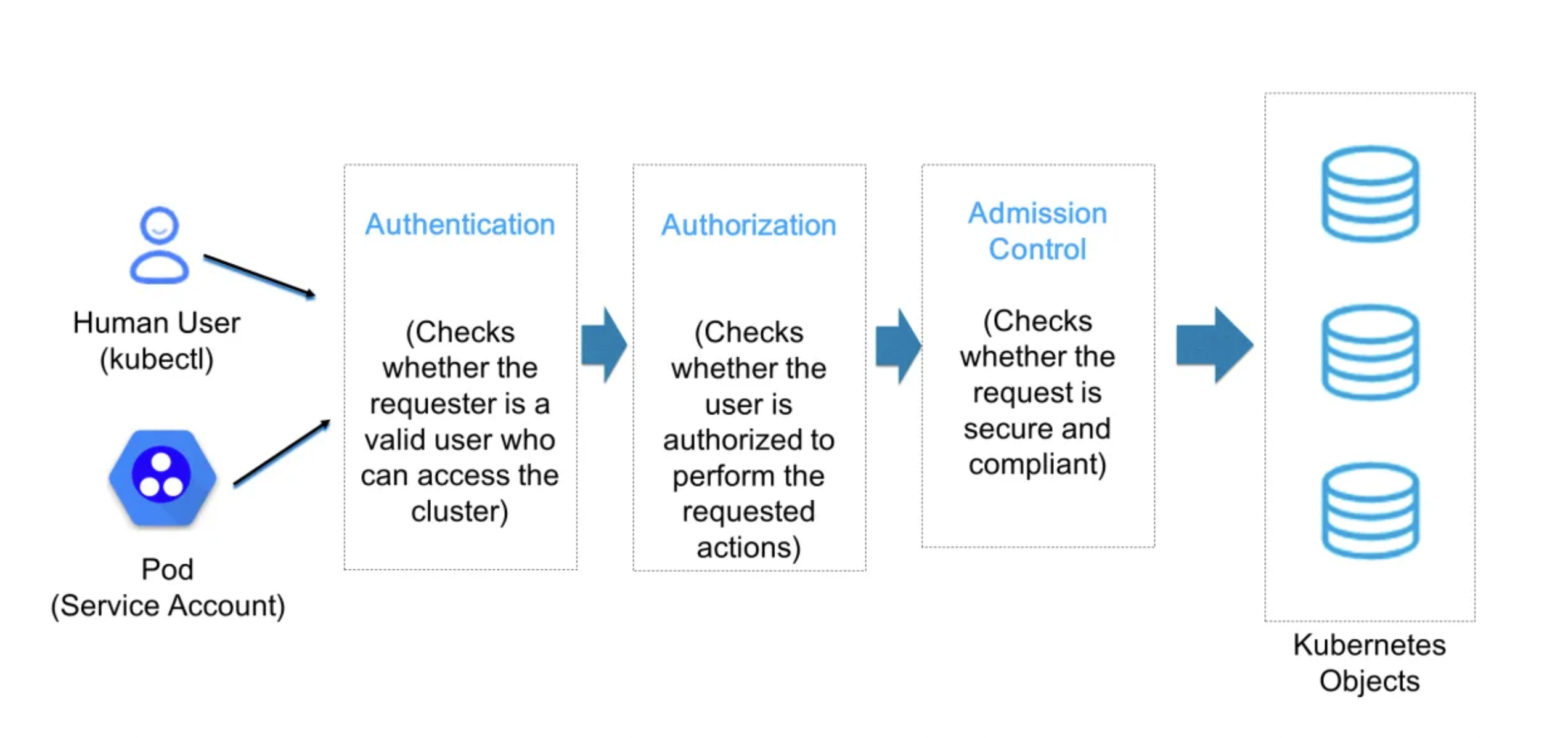
In Kubernetes, there are two types of accounts
User Account
Service Account
User account: User accounts are used to log into a Kubernetes cluster and manipulate resources therein. Each user account is associated with a unique set of credentials, which are used to authenticate the service’s requests.
Service Account: Kubernetes Service Accounts are specialised accounts used by applications and services running on Kubernetes to interact with the Kubernetes API.
Here are the simple terms to understand user & service accounts:
User Account: Represents a person accessing the cluster (e.g., via kubectl).
Service Account: Represents an application or pod accessing the cluster.
User Authentication: Managed externally (e.g., OIDC, certificates).
Service Account Authentication: Managed by Kubernetes with tokens.
User Scope: Cluster-wide.
Service Account Scope: Usually tied to a namespace.
Which account type should you use?
Use a User Account: When a human needs to interact with the Kubernetes cluster, such as developers, admins, or operators using tools like kubectl.
Use a Service Account: When an application or workload running inside the cluster needs to access Kubernetes resources programmatically.
Ex: A pod might use a service account to access ConfigMaps or Secrets within a specific namespace.
Deep dive into RBAC
There are multiple ways to create and authenticate a User in Kubernetes, such as:
Client Certificates
Bearer Tokens
Authenticating Proxy
HTTP Basic Authentication
Among these methods, Client Certificate authentication is one of the easiest to understand and commonly used approaches.
This certificates are used to create users. When a user perform any command like kubectl get po then K8's API will authenticate and authorize the request.
authentication: permission to login.
authorization: permission to work on resources.
So, To get in which context we are currently
kubectl config view
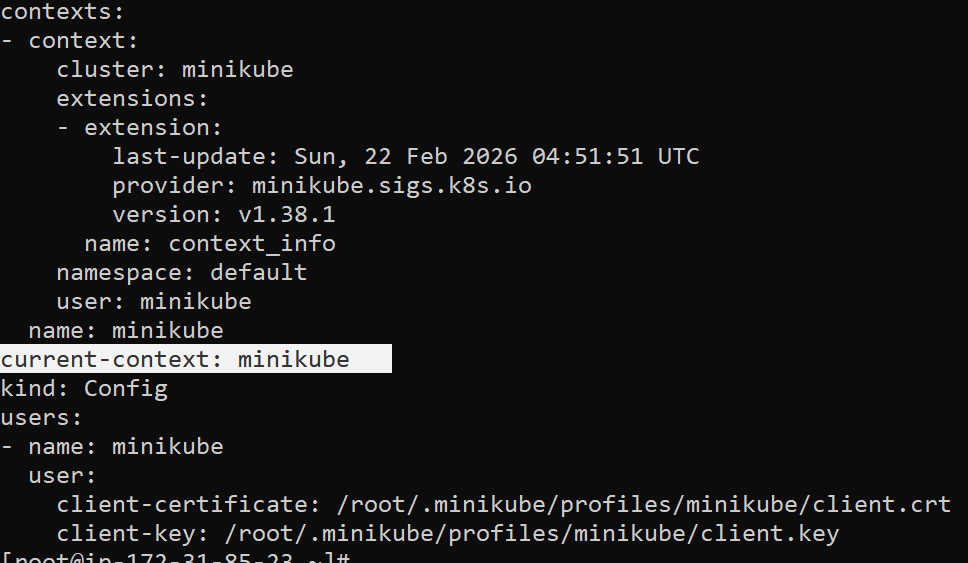
In Kubernetes, authentication and access management are handled through a configuration file called the kubeconfig file. One of the most important concepts in this file is the context.
What is a Context?
A context in Kubernetes is a combination of three elements:
Cluster – The Kubernetes cluster you want to connect to
User – The credentials used to authenticate
Namespace – The default namespace for operations
In simple terms:
A context = Cluster + User + Namespace
The context tells kubectl which cluster to talk to, which user credentials to use, and which namespace to operate in by default.
Is There One Context Per User?
Not necessarily.
Although a context includes a user, it is not limited to one context per user. A single user can have multiple contexts depending on:
Different clusters
Different namespaces
For example:
A developer may access both a development cluster and a production cluster
The same user may work in different namespaces such as
frontend,backend, ortesting
Each combination would typically have a separate context
In Kubernetes, you do not directly “switch users.”
Instead, you switch contexts.
If different contexts are configured with different users, switching the context effectively switches the user as well.
Example Scenario
Suppose you have:
One user:
dev-userTwo clusters:
dev-clusterandtest-cluster
You can create two contexts like this:
users:
- name: dev-user

clusters:
- name: dev-cluster
- name: test-cluster

contexts:
- name: dev-context
  context:
    cluster: dev-cluster
    user: dev-user
    namespace: frontend

- name: test-context
  context:
    cluster: test-cluster
    user: dev-user
    namespace: backend
Here:
Both contexts use the same user
But they connect to different clusters
And may use different namespaces
What Happens When You Switch Context?
If you run:
kubectl config use-context dev-context
You connect to:
dev-clusterUsing
dev-userIn namespace
frontend
If you switch to:
kubectl config use-context test-context
You connect to:
test-clusterUsing the same user
In namespace
backend
Client Certificate authentication
First create a folder
mkdir rama-user && cd rama-user
Generate a key using openssl
openssl genrsa -out rama.key 2048
Generate a Client Sign Request (CSR)
openssl req -new -key rama.key -out rama.csr -subj "/CN=rama/O=group1"
Generate a Certificte to create the
openssl x509 -req -in rama.csr -CA ~/.minikube/ca.crt -CAkey ~/.minikube/ca.key -CAcreateserial -out
rama.crt -days 500
Create a User
kubectl config set-credentials rama --client-certificate=rama.crt --client-key=rama.key
Till now we created user and certificate
now , we need to create context
To create context
kubectl config set-context ramacontext --cluster=minikube --user=rama
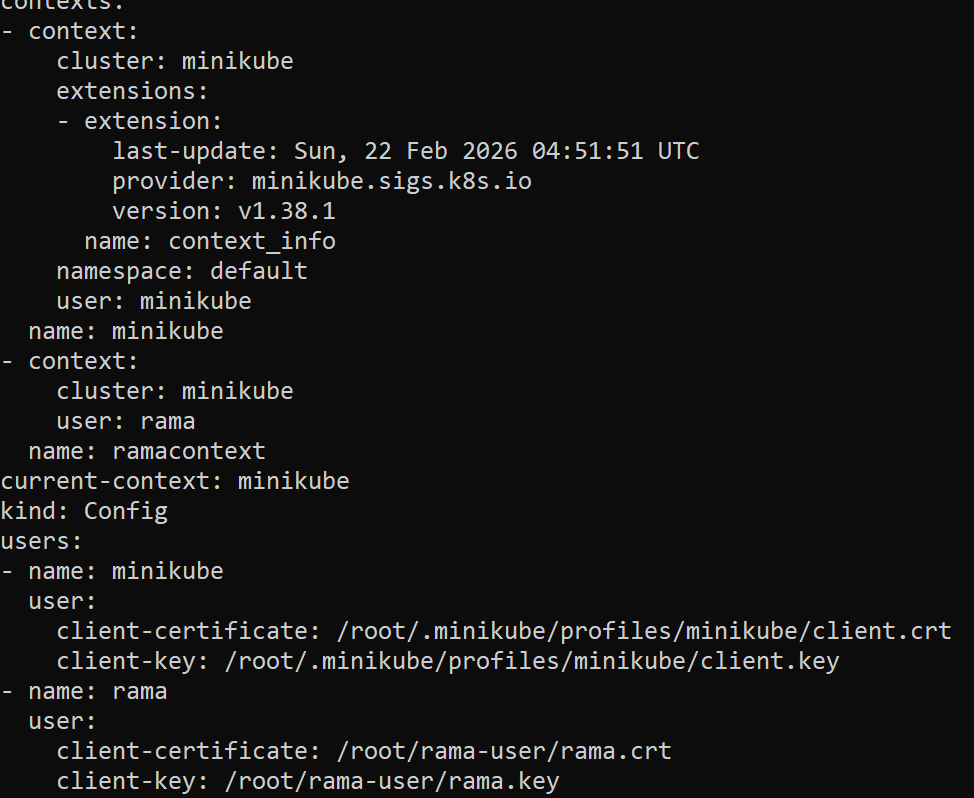
To switch context means user will be switched
kubectl config use-context ramacontext
First, we generated the private key and certificate signing request (CSR).
Using the cluster’s Certificate Authority (CA), we signed the CSR to create a client certificate.
With this signed certificate, Kubernetes identifies the user based on:
Common Name (CN) → Username
Organization (O) → Group
This means the certificate itself represents the user identity in Kubernetes.
After generating the certificate, we added the user credentials to the kubeconfig file using the client certificate and key.
we created user but he can't perform any actions since we haven't given any permissions
in our terms admin(minikube) should provide the permissions
There are four main RBAC components:
1. Role
A Role defines a set of permissions within a specific namespace. It controls what actions can be performed on which resources inside that namespace.
2. RoleBinding
A RoleBinding assigns a Role to a user, group, or service account within a namespace.
3. ClusterRole
A ClusterRole defines permissions at the cluster level. It can grant access to cluster-scoped resources (like nodes) or to resources across all namespaces.
4. ClusterRoleBinding
A ClusterRoleBinding assigns a ClusterRole to a user, group, or service account at the cluster level.
Let's create a Role and Rolebinding
Create two namespaces i.e Dev , Test
kubectl ns dev && kubectl ns test
Create one pod in each namespace
kubectl run mydevpod1 --image=nginx -n dev
kubectl run mytestpod1 --image=nginx -n test
We need to create role in admin context only
apiVersion: rbac.authorization.k8s.io/v1
kind: Role
metadata:
  name: my-dev-role
  namespace: dev
rules:
- apiGroups: [""]
  resources: ["pods"]
  verbs: ["get", "watch"]
In Kubernetes RBAC, apiGroups specifies which API group the resource belongs to.
The empty string ("") represents the core API group (also called the legacy API group).
pods
services
configmaps
secrets
persistentvolumeclaims
namespaces
Now create role binding
---

apiVersion: rbac.authorization.k8s.io/v1
kind: RoleBinding
metadata:
  name: my-dev-rolebinding
  namespace: dev
subjects:
- kind: User
  name: rama
  apiGroup: rbac.authorization.k8s.io
roleRef:
  kind: Role
  name: my-dev-role
  apiGroup: rbac.authorization.k8s.io
Cluster-wide permissions in Kubernetes are managed using ClusterRole and ClusterRoleBinding. They work almost the same way as Role and RoleBinding, with a few key differences
Conclusion
With RBAC, you can enforce principle of least privilege: users and applications only get the permissions they need. By combining Roles, RoleBindings, ClusterRoles, and ClusterRoleBindings, you can secure both namespace-scoped and cluster-wide resources effectively.
If you found this guide useful, please like ❤️, comment, and share your thoughts or questions. Stay tuned for the next part, where we'll explore advanced Docker concepts and practices.
Thank you,
Yours, Rama Grandhi