Stop Losing Pod Data! Learn Kubernetes Volumes the Right Way 📦
Part- 9
Till now, we have created Pods and explored many Kubernetes concepts. For security, we learned about RBAC. For managing configuration and sensitive information, we used ConfigMaps and Secrets.
But one important question remains — how do we safely store application data for containers?
In Docker, we use Docker volumes to persist data. But what about Kubernetes?
In Kubernetes, we also have Volumes. They help us store and manage data properly so that it is not lost when containers restart or Pods are recreated.
Let’s understand how Kubernetes Volumes work and why they are important.
There are of 3 types of volumes in K8s
emptyDir – Temporary storage created when a Pod starts and deleted when the Pod is removed.
hostPath – Mounts a file or directory from the Node’s local filesystem into a Pod.
PersistentVolumeClaim (PVC) – Used to request persistent storage from a PersistentVolume (PV); data remains even if the Pod is deleted.
emptyDir:
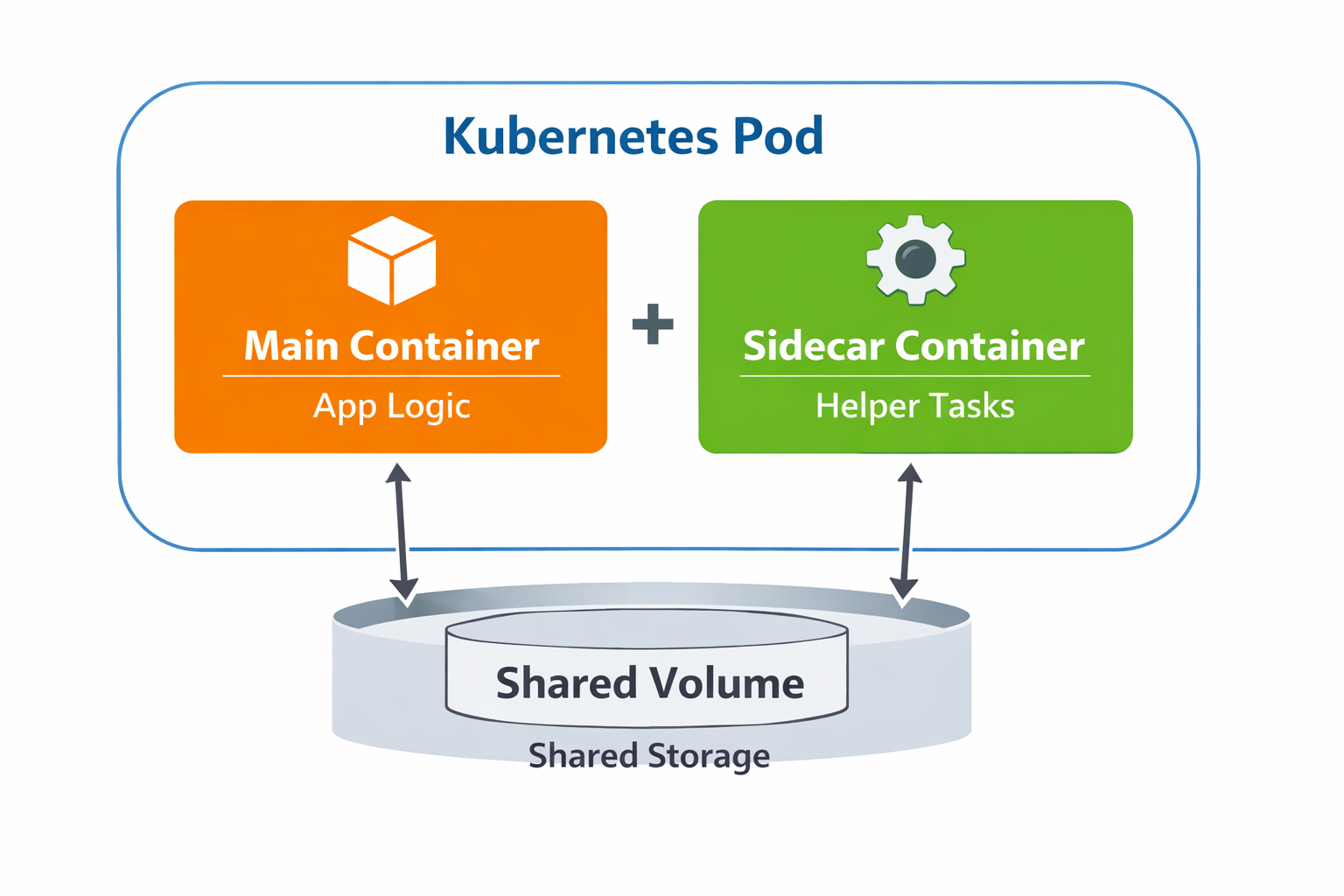
In the emptyDir type of volume, the volume is created along with the Pod.
This volume can be mounted to both the main container and the sidecar container inside the same Pod, allowing them to share data.
Now, what is a sidecar container?
A sidecar container is also called a helper container. It runs alongside the main application container within the same Pod and supports it by handling additional tasks.
Sidecar containers are commonly used for:
Logging application logs
Sending metrics for monitoring tools like Grafana
Forwarding logs to centralized logging systems
Backing up data
Managing configuration updates
Instead of adding all these responsibilities into the main application container, we separate them into a sidecar container. This keeps the main application clean and focused only on business logic.
Deployment Manifest File for Volumes with type of emptyDir
apiVersion: apps/v1
kind: Deployment
metadata:
  name: emptydir-demo
spec:
  replicas: 1
  selector:
    matchLabels:
      app: emptydir-app
  template:
    metadata:
      labels:
        app: emptydir-app
    spec:
      containers:
      - name: main-container
        image: nginx
        volumeMounts:
        - name: shared-volume
          mountPath: /usr/share/nginx/html

      - name: sidecar-container
        image: busybox
        command: ["/bin/sh", "-c"]
        args:
          - while true; do
              echo "Hello from Sidecar" >> /data/index.html;
              sleep 5;
            done
        volumeMounts:
        - name: shared-volume
          mountPath: /data

      volumes:
      - name: shared-vol
ume
        emptyDir: {}
In real-time production environments, we generally do not use emptyDir for storing important application data.Because when a Pod is deleted, the entire emptyDir volume is also deleted. Since Pods are temporary and can be recreated at any time (due to scaling, failures, rolling updates, etc.), any data stored in emptyDir will be lost.
Pods are short-lived objects in Kubernetes, so using emptyDir for permanent storage does not make sense.
Instead, emptyDir is mainly used for:
Temporary files
Caching
Sharing data between containers inside the same Pod
Temporary logs
Processing intermediate data
hostPath :
In the hostPath volume type, the data is stored on the Node’s filesystem instead of inside the Pod.
When we create the Pod, we attach a hostPath volume that points to a specific directory on the Node. The container can then read and write data to that directory.
Because the data is stored on the Node itself, even if the Pod is deleted, the data will still remain on that Node. So in that sense, the data is not lost like in emptyDir.
Deployment Manifest file for hostPath type
apiVersion: apps/v1
kind: Deployment
metadata:
  name: emptydir-demo
spec:
  replicas: 1
  selector:
    matchLabels:
      app: emptydir-app
  template:
    metadata:
      labels:
        app: emptydir-app
    spec:
      containers:
      - name: main-container
        image: nginx
        volumeMounts:
        - name: shared-volume
          mountPath: /usr/share/nginx/html

      - name: sidecar-container
        image: busybox
        command: ["/bin/sh", "-c"]
        args:
          - while true; do
              echo "Hello from Sidecar" >> /data/index.html;
              sleep 5;
            done
        volumeMounts:
        - name: shared-volume
          mountPath: /data

      volumes:
      - name: shared-volume
        hostPath:
           path: /etc/rama
However, this does not completely solve the problem.
Why?
The data exists only on that specific Node.
If the Pod is scheduled to another Node, the data will not be available there.
If the Node fails, the data is lost.
It is not portable or recommended for production workloads.
So, while hostPath keeps data after Pod deletion, it is mainly used for testing, development, or special system-level use cases not for real production applications.
PVC and PVC Claims:
In real-world scenarios, we often face issues with ephemeral storage like emptyDir and hostPath. With these volume types, the data may be lost when the Pod is deleted or moved to another node.
To solve this problem, Kubernetes provides Persistent Volumes (PV) and Persistent Volume Claims (PVC) for reliable data storage.
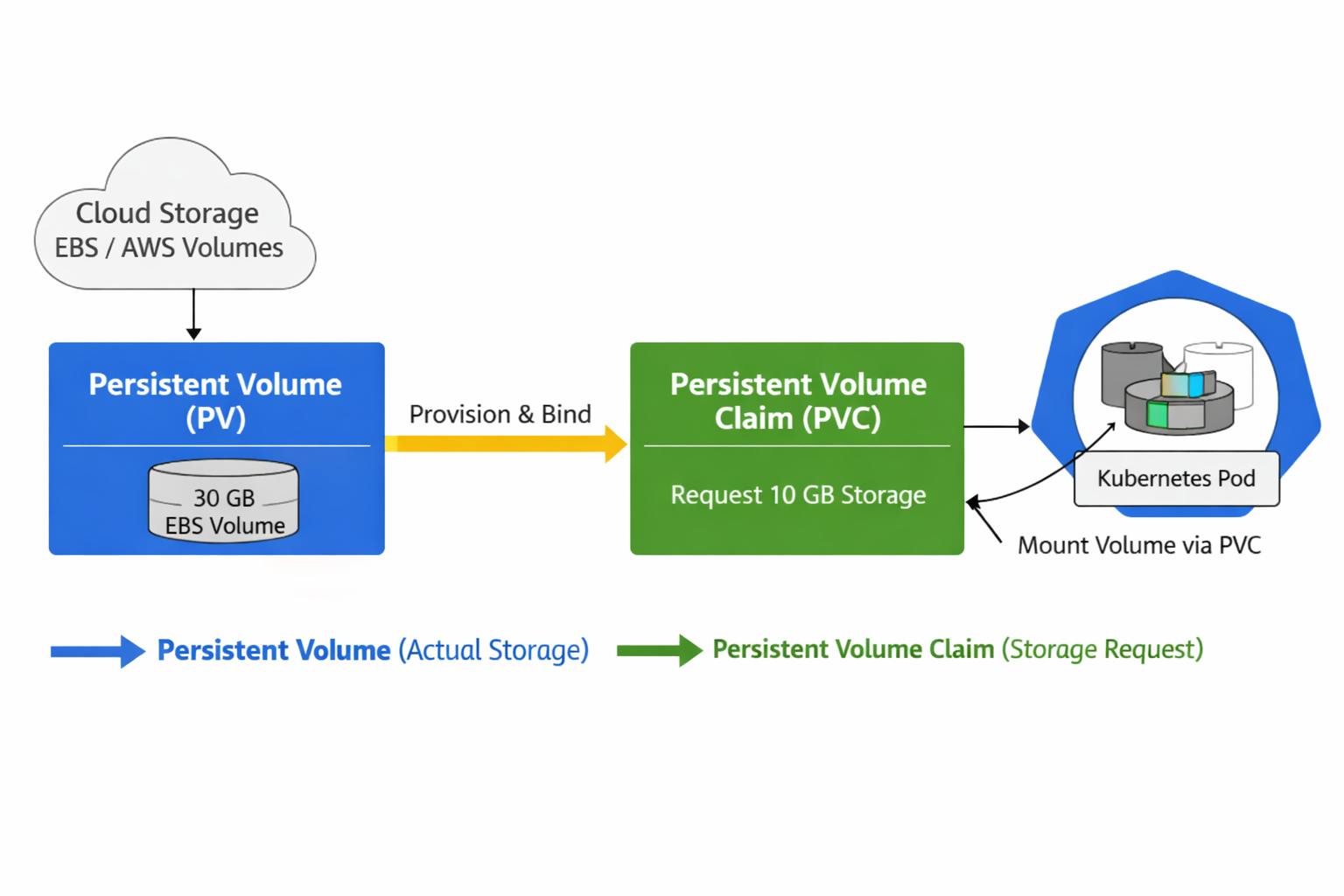
In practice, we attach a cloud storage volume such as Amazon Elastic Block Store to the cluster and create a Persistent Volume (PV) from it. Then we create a Persistent Volume Claim (PVC) to request the required storage from that PV.
For example, if we have a 30 GB EBS volume, we can create a PVC requesting 10 GB of storage. The Pod then uses this storage through the PVC.
So, PV and PVC are separate Kubernetes objects:
PV → Represents the actual storage resource (like the EBS volume).
PVC → A request made by a Pod to use a portion of that storage.
Manifest File for PV
apiVersion: v1
kind: PersistentVolume
metadata:
  name: my-pv
spec:
  capacity:
    storage: 30Gi
  accessModes:
    - ReadWriteOnce
  awsElasticBlockStore:
    volumeID: vol-1234567890abcdef0
    fsType: ext4
  persistentVolumeReclaimPolicy: Retain
Manifest File for PVC Claim
apiVersion: v1
kind: PersistentVolumeClaim
metadata:
  name: my-pvc
spec:
  accessModes:
    - ReadWriteOnce
  resources:
    requests:
      storage: 10Gi
Manifest File for Deployment
apiVersion: apps/v1
kind: Deployment
metadata:
  name: pvc-deployment
spec:
  replicas: 2
  selector:
    matchLabels:
      app: nginx
  template:
    metadata:
      labels:
        app: nginx
    spec:
      containers:
      - name: nginx
        image: nginx
        volumeMounts:
        - mountPath: /data
          name: storage
      volumes:
      - name: storage
        persistentVolumeClaim:
          claimName: my-pvc
Conclusion
Understanding how Kubernetes handles storage is essential when running applications in production. Volumes allow containers to store and share data, but each type of volume serves a different purpose.
We saw that emptyDir is useful for temporary storage and sharing data between containers in the same Pod, but the data is deleted when the Pod is removed. hostPath stores data on the Node’s filesystem, which allows the data to remain even if the Pod is deleted, but it is tightly coupled to a specific Node and is not reliable for production workloads.
To solve these limitations, Kubernetes provides Persistent Volumes (PV) and Persistent Volume Claims (PVC). With this approach, storage is managed independently of Pods, allowing applications to retain data even if Pods restart, move to different Nodes, or are recreated.
By using PV and PVC, we can build more reliable and scalable applications in Kubernetes, ensuring that important data is preserved while maintaining the flexibility of containerized workloads.
If you found this guide useful, please like ❤️, comment, and share your thoughts or questions. Stay tuned for the next part, where we'll explore advanced Docker concepts and practices.
Thank you,
Yours, Rama Grandhi
Comments
Join the discussionNo comments yet. Be the first to comment.